

Our teams of holiday rental experts will assist you with your rental project and share useful tips with you on our blog. More information about Homerez
If you are a vacation rental owner, you have probably heard about the Booking.com extranet site. It is the control center where you manage your property listing, update your calendar, adjust pricing, communicate with guests, and monitor reservations.
For many property owners, the extranet is the first real step into professional short-term rental management. But while it is powerful, it can also feel overwhelming at first—especially if you are managing multiple properties or trying to list on more than one platform.
In this guide, we will walk you through everything you need to know: how to access the Booking.com extranet site, how the booking extranet login works, what tools you can find inside, and how to use it to improve your visibility and bookings. We will also explain why many owners choose to work with Homerez to simplify their distribution strategy across Booking.com and other major travel platforms.
What Is the Booking.com Extranet Site?
The Booking.com extranet site is an online dashboard designed for property partners. Once your accommodation is listed on Booking.com, you get access to a private interface where you can manage all operational aspects of your listing.
Think of it as the “back office” of your property on Booking.com. This is where you control:
- Availability and calendar updates
- Pricing and promotions
- Booking conditions and cancellation rules
- Guest messaging
- Payments and invoicing
- Property information and photos
- Performance analytics
For vacation rental owners, the extranet is essential because it directly affects how your property appears to travelers and how easily guests can book.
Booking Extranet Login: How to Access Your Account
To manage your listing, you need to go through the booking extranet login process. This is done through the official partner portal.
Most owners access the system via the admin interface, which is why many users search for:
- booking extranet login
- booking.com login extranet
- admin.booking.com extranet login
Once logged in, you can switch between properties (if you manage more than one), check reservations, update pricing, and handle everything related to your listing.
Common Login Issues (and How to Fix Them)
Many owners struggle with the booking extranet login at some point. Here are the most common issues:
- Wrong email address: The extranet account is linked to the email used during registration.
- Forgotten password: You can reset it from the login page.
- Two-factor authentication: Some accounts require an extra verification step.
- Access rights: If your property is managed by a partner or a co-host, permissions may be limited.
If you are working with a professional service like Homerez, these issues can often be avoided entirely because account setup and configuration are handled correctly from the start.
What You Can Do Inside the Booking.com Extranet Site
Once you enter the Booking.com extranet site, you will find multiple sections. Each one plays a key role in your success on the platform.
Let’s break down the most important features for vacation rental owners.
1) Manage Your Calendar and Availability
The calendar is one of the most crucial tools in the extranet. It determines whether your property is bookable or not.
Inside the extranet, you can:
- Open and close dates
- Set minimum stay rules
- Add restrictions for specific seasons
- Block dates for personal use
- Adjust check-in/check-out rules
This part is extremely important because even a small mistake can lead to overbookings, missed reservations, or low ranking on the platform.
Owners who list their property on multiple channels often face a bigger challenge: keeping availability synchronized everywhere. This is one of the main reasons many choose to use a channel manager or a distribution partner like Homerez.
2) Update Prices, Rates, and Promotions
Pricing is another key area inside the Booking.com extranet site.
You can set:
- Standard nightly prices
- Weekly or monthly rates
- Seasonal pricing
- Special offers (early bird, last-minute, etc.)
- Discounts for mobile users
- Genius program participation
Booking.com is known for rewarding properties that use its pricing tools and promotions. For example, enabling certain discounts can improve your ranking and visibility.
However, the downside is that the system can quickly become complex. Many owners end up applying too many discounts at once, which can reduce profitability without actually increasing net revenue.
A professional partner can help you set a pricing strategy that is competitive and optimized across multiple platforms—not just Booking.com.
3) Edit Your Listing Content (Photos, Description, Amenities)
Your listing content is what sells your property.
In the extranet, you can update:
- Property title
- Descriptions
- Room and bed configurations
- Amenities
- House rules
- Photos
Booking.com places strong importance on content quality. Listings with complete information, professional photos, and detailed descriptions tend to convert better and rank higher.
For vacation rental owners, this is an opportunity—but also a time-consuming task. A listing needs to be both guest-friendly and SEO-friendly within the platform itself.
Homerez helps owners create optimized listings with high-quality content that performs well not only on Booking.com but also on other major platforms.
4) Manage Reservations and Guest Communication
Another major part of the Booking.com extranet site is the reservation management system.
You can:
- View upcoming bookings
- Confirm check-in information
- Send messages to guests
- Respond to special requests
- Handle cancellations or modifications
Booking.com travelers often expect fast communication. If response times are slow, it can impact your reviews and even your ranking.
For owners managing their property alone, guest communication can become stressful—especially during high season.
Homerez can support owners by providing professional assistance and helping streamline the booking process, depending on the service package.
5) Payments, Invoices, and Commission Tracking
Booking.com works with different payment models depending on the country and property type.
Inside the extranet, you can monitor:
- Commission invoices
- Payment status
- Guest payment methods
- Payout details (if Booking handles payments)
- Tax settings
This is where many first-time hosts get confused. Understanding commission, VAT, and payment schedules is critical to managing your rental business properly.
A distribution partner like Homerez can help you avoid financial surprises and ensure your listing is configured correctly.
6) Performance Dashboard and Analytics
Booking.com provides performance insights inside the extranet.
You can track:
- Number of views
- Conversion rate
- Booking trends
- Competitor benchmarks (in some markets)
- Ranking improvements after promotions
These tools are valuable, but they are often underused. Many owners log in only to update prices or availability, missing the bigger picture.
If you want to maximize revenue, you need to actively monitor performance and adapt.
Homerez does this continuously across platforms, using data-driven optimization to improve your results.
Why the Booking.com Extranet Site Can Feel Difficult for Owners
The Booking.com extranet site is powerful, but it is not always intuitive—especially for owners who are not familiar with professional hospitality tools.
Here are the most common challenges:
Too Many Settings
Booking.com offers many configuration options: pricing, restrictions, policies, promotions, payment settings, and more. This flexibility is great, but it can be overwhelming.
Risk of Errors
A wrong calendar setting, cancellation policy, or pricing rule can directly impact your revenue or guest satisfaction.
Time-Consuming Management
If you update your rates daily, respond to guests, and optimize promotions, the extranet can become a full-time job.
Multi-Platform Complexity
Many owners do not want to rely on one channel only. But managing multiple extranets (Booking, Airbnb, Vrbo, Expedia…) is extremely time-consuming.
Booking.com Extranet vs Other Platforms: What Makes It Special?
Booking.com is one of the most influential platforms for vacation rentals in Europe and beyond. Its extranet has unique characteristics that differ from Airbnb or Vrbo.
Strong Focus on Instant Booking
Booking.com is built for fast conversion. Travelers expect immediate confirmation, which is why availability and pricing accuracy are essential.
Advanced Pricing Tools
Booking.com provides many options for discounts and promotions, sometimes more than other platforms.
Huge International Visibility
Booking.com attracts travelers from all over the world. This can be a major advantage for owners who want international guests.
Ranking Depends on Many Factors
Visibility is influenced by multiple elements: pricing, reviews, response time, promotions, and content quality.
This makes Booking.com a high-opportunity platform—but one that rewards owners who manage it actively.
Best Practices to Use the Booking.com Extranet Site Effectively
If you want to make the most of your Booking.com presence, here are some proven tips.
Keep Your Calendar Always Updated
An outdated calendar can lead to overbooking or lost reservations. Update it frequently, especially if you list on multiple platforms.
Use Promotions Strategically
Discounts can boost ranking, but avoid stacking too many offers. Always calculate your net income after commission.
Optimize Your Content
Complete amenities, strong photos, and detailed descriptions improve conversion rate.
Respond Quickly to Guests
Fast communication leads to better reviews and stronger performance.
Monitor Your Analytics
Track your conversion rate and views. If views are high but bookings are low, your price or content may need improvement.
Do You Need to Manage the Booking.com Extranet Site Yourself?
Not necessarily.
Many owners start by managing everything alone, but as soon as they want to scale—or list on multiple platforms—it becomes difficult.
If your goal is to:
- Increase occupancy
- Improve pricing strategy
- Reach international travelers
- Avoid dependency on a single platform
- Save time managing multiple extranets
…then you may benefit from working with a professional.
How Homerez Helps Owners Get the Best of Booking.com (and More)
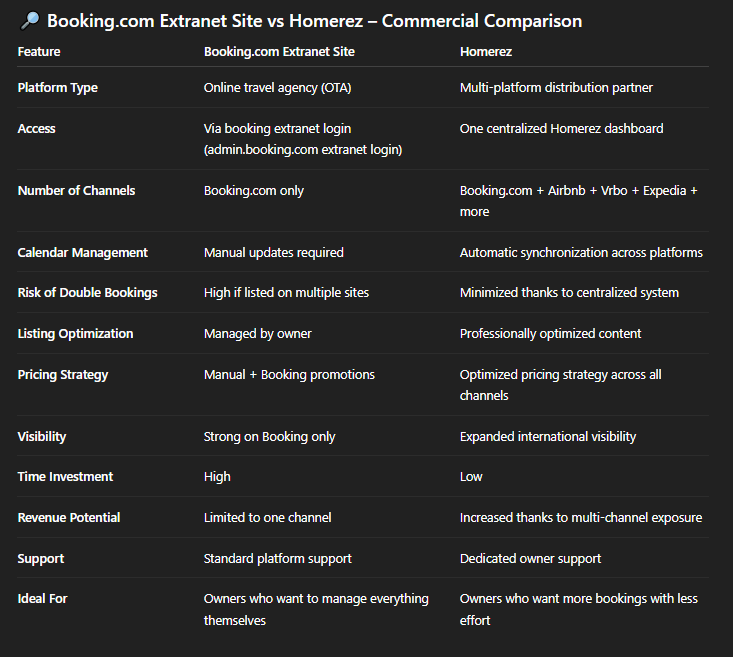
Booking.com is a key channel for vacation rental visibility, but it should not be your only one.
Homerez helps property owners take advantage of the Booking.com extranet site indirectly—without having to manage every detail manually.
With Homerez, you can:
- List your property on Booking.com and other major platforms
- Benefit from optimized content and distribution
- Reduce the risk of calendar mistakes and double bookings
- Save time by centralizing management
- Increase your visibility across multiple channels
- Improve occupancy and revenue through professional optimization
Instead of spending hours navigating the booking extranet login, updating rates manually, and managing settings in different extranets, Homerez offers a simplified solution designed for vacation rental owners.
Final Thoughts
The Booking.com extranet site is a powerful tool for vacation rental owners. It gives you full control over your listing, your pricing, your calendar, and your guest experience. With the right strategy, it can help you increase bookings and reach a global audience.
However, managing the extranet takes time, attention, and experience—especially if you want to maximize your results and expand beyond Booking.com.
That is why many owners choose Homerez: to benefit from the visibility of Booking.com while also reaching other leading platforms, all with a simplified and professional management approach.
If you want to increase bookings without spending your days in the admin.booking.com extranet login, Homerez can help you grow your rental business more easily.






.png)